
Intranet, DMS, and project information: how it all comes together in Microsoft 365
Many organizations invest in standalone solutions for intranets, document management, and project environments. On paper, everything seems to be in place: an intranet for internal communication, SharePoint or a DMS for documents, and Teams for collaboration.
Yet there is often a lack of cohesion. Information is scattered, knowledge is hard to find, and each project operates in its own way. Employees often know that the information is out there somewhere, but they don’t know where to start looking.
The root of the problem lies not in the tools themselves, but in how they are integrated. After all, information sharing doesn’t stop at individual projects; it affects the entire organization and largely determines how efficiently and predictably projects proceed.
Intranet as the starting point, DMS as the backbone
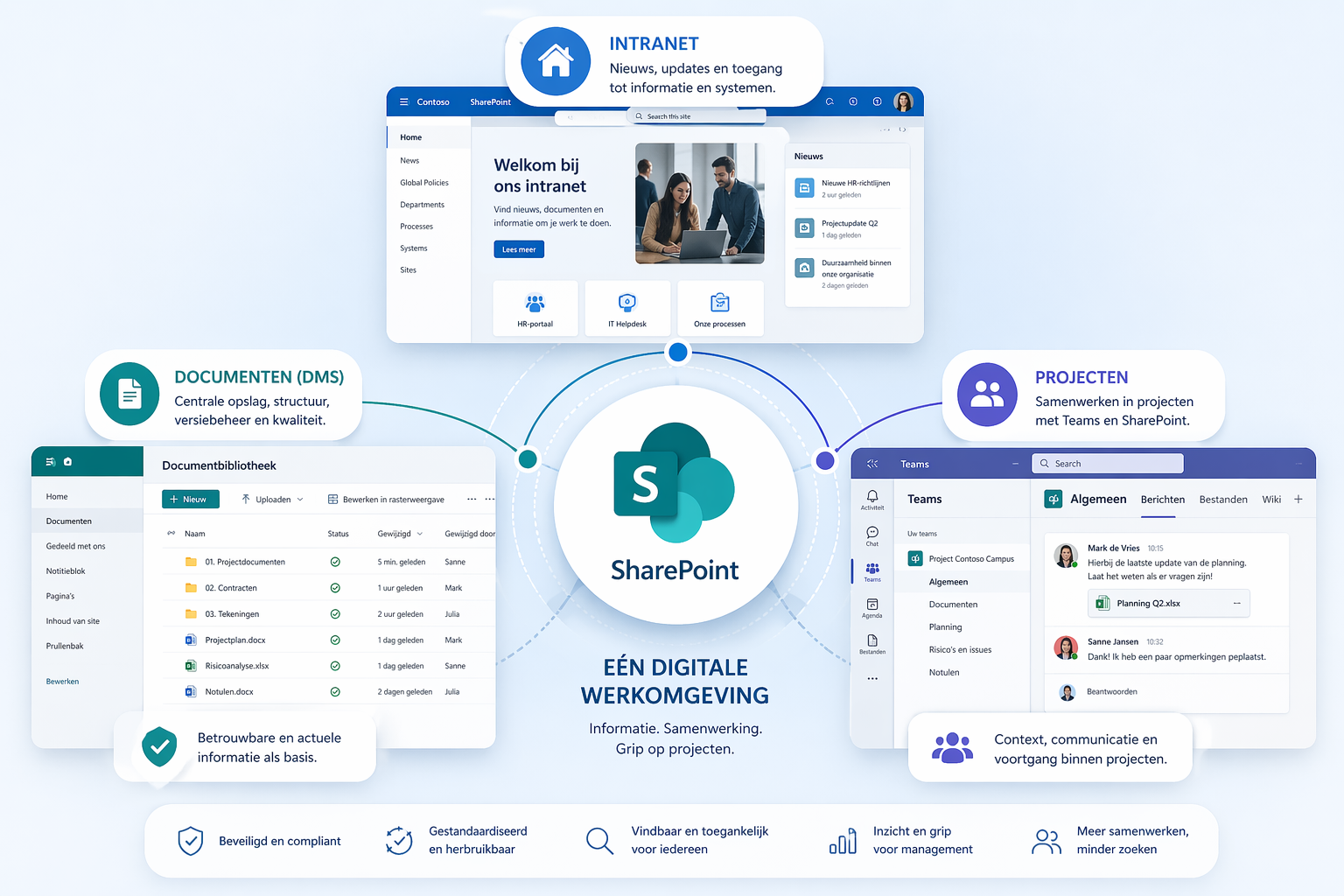
Within Microsoft 365, the intranet and DMS each play a distinct role. For many organizations, the intranet is where the workday begins: news, updates, processes, and access to systems. The DMS provides the framework within which documents are managed, validated, and retrieved.
We are also seeing a variation on this more and more often: a project portal. This is similar to an intranet but is specifically designed for projects. Here, employees can find project news, milestones, schedules, and relevant documentation. This means that project information is not only stored but also actively presented.
When these layers are properly integrated, they form a cohesive whole. The intranet or project portal links to the right information, while the DMS ensures that information remains reliable and up-to-date.
Without this coherence, familiar situations arise:
- Employees are searching for the same information in multiple places
- documents are copied instead of consulted
- Project information and organizational documentation become separated
By treating the intranet, project portals, and DMS as a single integrated system, information becomes not only accessible but also practical for everyday use.
Project information as part of the organization
Projects are often set up as separate environments. This makes sense given the dynamic nature of projects, but it also leads to information becoming isolated. Documents, knowledge, and best practices remain confined to the project, even though they are valuable to the rest of the organization.
A well-designed Microsoft 365 environment breaks this cycle. By using standard structures, unambiguous metadata, and established workflows, consistency is created across projects. Information becomes comparable, transferable, and more useful outside the context of a single project.
This has a direct impact on how organizations operate:
- knowledge becomes reusable across projects
- individuals' dependence is decreasing
- workflows become more consistent and predictable
For operations and management, this means greater control over implementation and less variation in how projects are structured and managed.
Accessibility and ease of use are key to success
A digital work environment may be technically well-designed, but if it isn’t used, it’s of little value. In practice, employees quickly turn to alternatives if systems don’t feel intuitive. For example, they might save files outside the system or share documents via email.
Ease of use, therefore, lies not only in the interface, but above all in the underlying structure. Employees need to intuitively understand where information is located and what they can do with it. This requires clear decisions regarding how systems are designed and used.
Key principles in this regard are:
- one clear location for each type of information
- as few manual steps as possible
- a consistent structure across teams and projects
When set up properly, this creates a sense of calm. Employees no longer have to worry about where things are; instead, they can focus on their work. Ultimately, that is what a digital work environment is all about.

From standalone tools to a single digital workspace
Microsoft 365 provides all the building blocks for an integrated work environment, but its true value lies in how these components are connected.
In many organizations, intranets, project environments, and document management systems coexist. Only when these are deliberately aligned can an environment be created in which information is organized in a logical manner.
In practice, this means that different layers reinforce one another. The intranet or project portal provides an overview and context, Teams facilitates collaboration, and the DMS ensures the quality and structure of documents. Automation supports processes such as approvals and status updates.
When all these elements come together effectively, it creates a single digital workspace where employees don’t have to search for information but can immediately start working with the right information.
What this means for project organizations
When the intranet, DMS, and project environments are well integrated, information sharing becomes a strength rather than a bottleneck.
The impact is felt on multiple levels:
- spend less time searching for and fixing errors
- better collaboration across projects and teams
- greater control over document flows and processes
For management, this means they can make decisions based on reliable and up-to-date information. Decision-making becomes less reliant on assumptions and more based on insight.
Conclusion
In many organizations, the intranet, DMS, and project environments are set up separately from one another. In practice, this often slows things down because information becomes fragmented and difficult to use.
By treating these components within Microsoft 365 as a single integrated system, we create a digital work environment that not only supports but also actively contributes to better project management.
Mastering information doesn't start with a tool, but with coherence.