SharePoint isn't a DMS unless you set it up that way
Many project teams use SharePoint on a daily basis. Documents are stored “somewhere,” Teams are set up, and everyone has access. Yet in practice, we keep hearing the same complaint: documents are hard to find, versions get mixed up, and no one is sure which information is correct.
The reason? SharePoint is being used as a storage repository, even though it’s supposed to function as a Document Management System (DMS). That’s possible, but only if you set it up that way.
SharePoint is often misused in projects
SharePoint is part of Microsoft 365 and offers powerful collaboration and document management capabilities. However, by default, it is not a project-specific DMS. When there is a lack of structure and established guidelines, information becomes scattered across various Teams and sites. The structure grows organically, folders expand, and version control becomes dependent on individual teams.
This quickly leads to familiar problems in projects:
- Documents are scattered across multiple Teams and libraries
- Version control is applied in an unclear or inconsistent manner
- The status of documents is not clearly defined
In a project environment, where planning, risk management, and decision-making depend on up-to-date information, this poses a direct risk. Not because the information is missing, but because its reliability is in question.
Why folder structures keep coming back
When organizations want to get a handle on their SharePoint environment, they often fall back on what feels familiar: folder structures. Folders provide a sense of structure and seem to bring order.
Yet there is a fundamental problem here. A folder indicates where a document is stored, but says nothing about the document’s significance within the project. Its status, its relationship to a project phase, or the discipline responsible for it are not explicitly recorded. This creates a false sense of structure: documents are “neatly” organized, but their content lacks context.
The result is predictable. Folders become increasingly nested, different teams use their own naming conventions, and version names turn into long strings like “final_v3_new.” What started as a clear overview ends up becoming a tangled mess.
When SharePoint Can Function as a DMS
SharePoint can function exceptionally well as a DMS, provided it is set up with information management in mind rather than storage logic. This requires a different way of thinking.
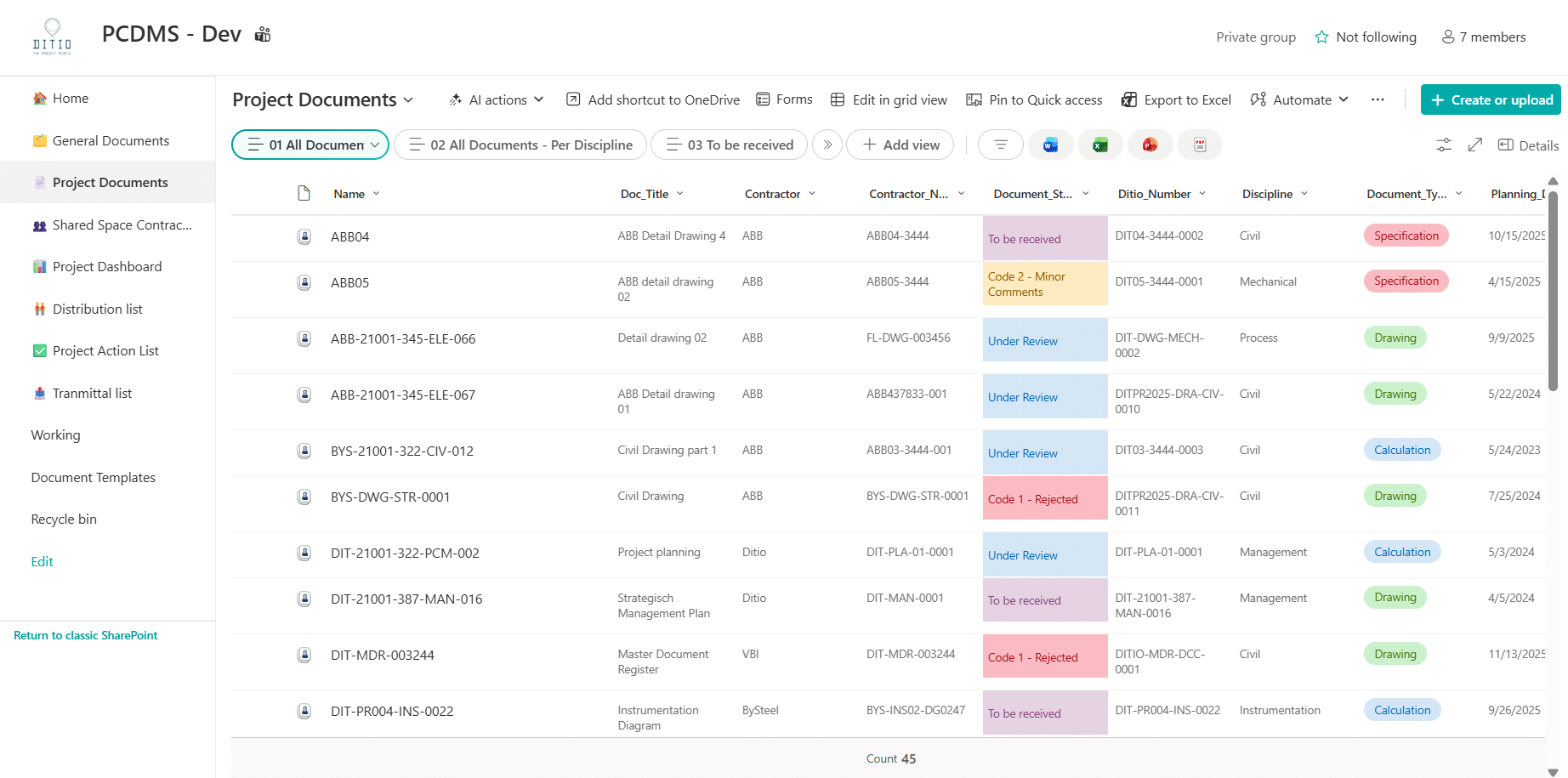
Thinking in terms of metadata rather than folders
Instead of organizing documents by location, they are categorized by content. Metadata describes what a document is and what role it plays within the project. For example:
- Project number or program line
- Document type or discipline
- Status (draft, pending review, approved)
Defining these characteristics creates flexibility. Views make it easy to filter, for example, by all approved documents or all documents within a specific project phase. The document itself does not need to be moved or copied; the context is built dynamically.
This approach is much better suited to project-based organizations, where information is viewed from various perspectives: planning, risk, discipline, or contract.
Smart version and revision management
An important feature of a DMS is change control. In many SharePoint environments, version history is enabled but is not actively used as a management tool.
When version and revision control are properly set up, it becomes clear who made changes, when they were made, and which version has been formally approved. This requires not only technical configurations but also agreements on when a document’s status changes and who is responsible for approval.
Well-organized version control contributes to:
- A single, centralized, and up-to-date source of truth
- Full traceability of changes
- Fewer debates about which version is the authoritative one
For organizations that deal with audits, external stakeholders, or contractual obligations, this is not a luxury but a necessity.

Processes are more important than technology
A common misconception is that document management is primarily a technical setup. In reality, the greatest benefits come from defining processes and assigning responsibilities.
Who is authorized to modify documents? When is a document formally adopted? How are revisions handled? Without clear answers to these questions, any organization remains vulnerable.
A DMS only works when technology, processes, and behavior are in balance. SharePoint can facilitate this, but the substantive decisions must come from the organization itself.
When SharePoint Is Not Sufficient as a DMS
There are situations in which SharePoint, even when properly configured, does not provide sufficient support. This is particularly true for complex engineering projects involving many external parties, extensive compliance requirements, or a highly regulated document lifecycle.
In such cases, a specialized DMS or EDMS designed specifically for the project may be a better fit. However, the decision to adopt a new system should never be based solely on functionality. The first question to ask is: what does the project process require of our document management system?
SharePoint as the foundation for managing project information
When SharePoint is configured as a full-fledged DMS, the role of document management changes fundamentally. Document statuses become reliable and can be linked to reports and dashboards.
Project managers gain insight into which documents are still under review, which documents are ready for decision-making, and where bottlenecks are occurring. Document management thus shifts from a support process to an active management tool within project management.
Ultimately, that’s what it’s all about: not just storing documents, but using information to make projects predictable and manageable.
Conclusion
SharePoint is not a document management system (DMS) in and of itself. However, with the right setup, clear processes, and a focus on adoption, it can become a powerful foundation for document management in project-based organizations.
The key lies not in adding more features, but in making informed decisions about how information is structured, managed, and used. Only then can SharePoint truly contribute to control, speed, and reliability in projects.
Are you unsure whether your SharePoint environment functions as a DMS or primarily as a storage repository?
We help project organizations set up their document management systems in a way that enhances control, speed, and reliability.
A brief analysis often provides a surprising amount of insight.